
Following the previous upgrades to my 2006 Mac Pro I finally decided to take the plunge and swap out the original dual core Xeon CPU’s for some quad core ones. A matched pair of Xeon 5355’s came up on Ebay at a sensible price and from a reputable seller so I snapped them up. The seller actually had four pairs for sale and they were sold pretty quickly so there is clearly still some demand for 5355’s.
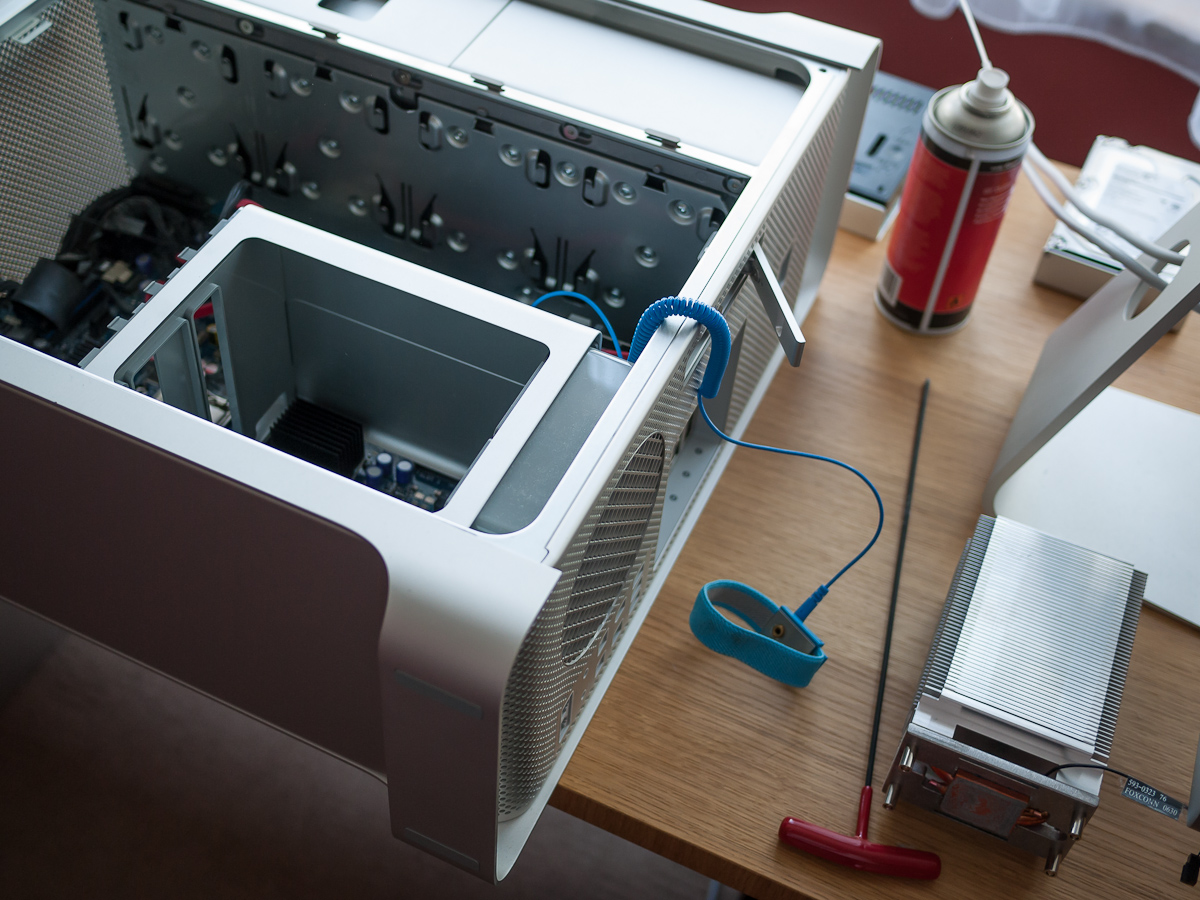
Heatsinks Removed
There are a multitude of videos available on Youtube detailing the relatively simple procedure of removing the old Xeons and replacing them. All you need are the new processors, some good thermal paste, a couple of Phillips screwdrivers and a 3mm Allen/Hex key which needs to ideally be at least 6″ long. You’ll also need something to clean the old thermal paste off of the heat sinks, isopropyl alcohol is ideal, anything else risks leaving residue which will negatively impact on the heat transfer between CPU and heat sink. Optional extras are a can of compressed air for cleaning out any dust build up and an anti-static wrist strap.
I won’t go into the full procedure here as others have already documented it well. A couple of points I would make are firstly many who have performed the upgrade refer to issues removing the memory cage screws, I had no such problems but did use a small jeweller’s screwdriver which allowed vertical orientation and full purchase with the screw head.

Original Xeon 5150’s
Secondly, I was surprised by how thick the factory application of thermal compound was when I removed the heat sinks, I had expected a thin veneer but it was definitely thicker than that. This rather threw me as to how much compound I should apply on re-installation.
In the end I decided to apply a thin line horizontally across the CPU’s with an additional smaller vertical line making a cross. I didn’t spread out the compound but instead allowed the pressure of re-attaching the heat sink to flatten it out.
Reassembly was straightforward, I even managed to complete the whole operation without dropping one screw. The machine promptly booted up and I ran Geekbench to assess what performance improvement the new Xeons were giving.

Geekbench Score Shows Huge Improvement
With the original Xeon 5150’s Geekbench would typical return a score in the low 5000’s. With the 5355’s the score has leapt to 9456, a very useful improvement in performance bringing my 2006 Mac Pro within touching distance of a 2012 iMac Core i7.
The only thing left to do now is monitor the CPU temperatures for a while to ensure the thermal compound is working well. There are a number of different apps out there that claim to give accurate read outs of the Pro’s thermal sensors, however in my experience they all seem to give different results. I’ve therefore decided to trust the software that I’m familiar with, namely Marcel Bresink’s aptly named ‘Temperature Monitor”.

Temperature Monitor
This is showing the cores running at an average of about 40°C under light load* which is around 30% higher than the previous processors. Considering there are twice as many cores and that the thermal compound has not broken in yet this seems pretty reasonable to me. Also a considerable upswing in the ambient temperature that has coincided with the upgrade must be taken into account.
I decided to download SMC Fan Control and crank the systems fans up by a couple of hundred RPM just to be on the safe side, they are still whisper quiet. There is one last issue that needed resolving, when you perform this upgrade and click on About This Mac you’re likely to get a processor unknown reading although System Report will show the correct number of cores.
There are a couple of solutions to this, you can try upgrading the 1,1 firmware to 2,1 using this utility. Or you can do what I did which was download the CPU injector Kext from here (updated with new link, see original article here) and install it with a kext utility, I used Kext Helper b7 here (updated with new link.)
*After three months of running smoothly the CPU temperatures under light load are now averaging around 32°C so clearly the thermal compound has bedded in well and I’ve been able to leave the fans running at factory settings. I recently installed Windows 7 and have been enjoying a number of games, the machine remains stable and reliable.
*More than 12 months have now passed since this upgrade and I’m pleased to report the machine is still running smoothly. Despite very hot ambient temperatures here presently, the Mac Pro remains whisper quiet.
*Update (08 December 2013) Following John’s post in the comments section below I returned to find some of the links in the original post broken. I have therefore hosted the CPU Injector Kext and the Kext Help B7 utility myself and updated the links. The original article covering the CPU injector Kext can by found at the Internet Archive. With regards to the machine itself it is still running perfectly.
*Update (19 December 2013) I’ve installed OS X Mavericks using the target disk mode method. Running Geekbench again under Mavericks yields a result of 9841.
*Update (11 October 2014) Another reader has pointed out that the links in the original post are broken again. I have therefore reolcated and hosted the CPU Injector Kext and the Kext Help B7 utility myself and updated the links.
*Update (7 May 2018) I have noticed that this post is still quite popular and I thought therefore that those reading it might be interested to know that this Mac Pro is still running without fault.
*Update (23 June 2020) This post remains popular, those reading it might be interested to know that this Mac Pro is still running without fault.
 Retrocosm's Vintage Computing, Tech & Scale RC Blog
Very cool post. Just got my hands on a 1,1 Mac Pro for $350. Ordered my processors and will do the swap when they arrive. Was there a particular guide that you found helpful when doing yours?
LikeLike
Not a specific one Ryan, there are a few videos on Youtube which are helpful. I think I looked at a number of videos and blog entries and sort of aggregated everyone’s experiences/advice. It is pretty straightforward as long as you are methodical and careful.
Nice price on the 1,1, you’re going to have quite a machine for not a lot of dosh!
LikeLike
Yeah, I’m pretty stoked about it. I’m hoping to have a pretty decent system for about $600.
LikeLike
Hello there. This post inspired me to upgrade my 1,1 and I just ordered the pair of X5355s from eBay for $70, and 16GB (8x2GB) RAM for $80, but I’m still not sure which 5770 to get. Is there a specific PC brand you recommend, or do you have the Apple one?
LikeLike
Hi John, I used an Apple spec model, there are usually a few floating around on Ebay allthough they are quite a lot more expensive than their essentially identical PC counterparts.
There’s a lot of info over on the Netkas forum regarding flashing PC cards. Nice price on the RAM, wish I could get it that cheap over here in the UK.
Good luck with your upgrade, my machine is still running beautifully.
LikeLike
Thank you for the quick reply! I was hoping you had flashed your card… LOL
Well, I’ll just have to be patient and see if I can land one cheap. As for the RAMs, if you need anything from this side of the pond, please let me know. Have a great weekend!
LikeLike
After reading your post, I too took the plunge to upgrade my 1,1 system. I found the processors for $45 and 16 (4x4g) RAM for $80 for a total of 24G RAM in the system. What I’d like to do is get the firmware upgraded to 2,1 such that the processor information reflects correctly. The post you reference didn’t talk about a 2006 (1,1) mac pro but the 2009 and 2010 models. Do you have any suggestions? Also, the processors are at an average of 30C and I have the fan cranked up to 1500RMP… is this something that will be a permanent thing or over time will I be able to drop the fans back down to factory defaults?
LikeLike
Hi John, I’m not sure about the firmware upgrade, I’ve never performed it myself. As I mentioned in the post I used the CPU Injector Kext method. I noticed that the links in the post were broken, I’ve now updated them. My CPU temperatures dropped steadily after the initial install; it takes a while for the thermal paste to bed in. Mine typically sit at around 35°C under light load and with intensive tasks they hit the mid to high 40’s. Perhaps try dropping your fans to 1000 RMP and see what sort of temps you get under light load.
LikeLike
I’ve dropped the fans down to 1000 and the temp goes up to about 50c. I also let the system fans run in “automatic” mode (470 rpm) and the temp shot up to 70c. These are all under a light load. I guess my ultimate question is, what are acceptable temperatures for light load and under moderate load? i.e. at what temp should I start to be concerned.
LikeLike
Those temperatures are in my opinion too high for light load. Personally I would be concerned that something is amiss and I would take a guess that heat is not being transferred properly to the heatsinks. It may be that there’s an issue with the thermal contact, possibly through poor quality or poor application of thermal compound.
How are you measuring the temperatures and which metric are you referring to?
LikeLike
I am using a tool called Temperature Monitor and to control the fans I use Mac Fan Control. The temperature metric is via Temperature Monitor CPU 1 – 8 where there is a temperature for each core. I didn’t tighten the heatsinks down very tight… does that connection need to be that tight?
LikeLike
John, it’s difficult to say, you don’t want to overdo it but they should certainly be done up well. Without seeing your machine it’s difficult to comment fully but my best guess is that the thermal contact betweem the processors and heat sink is not as efficient as it should be.
LikeLike
Can you point me in the direction of how to run Mavericks on a MacPro 1,1 using target disk mode?
LikeLike
Hi Albert, I just made a post:- https://retrocosm.net/2014/01/04/mac-pro-11-and-mavericks/
LikeLike
thanks for this post. I also purchased a 2006 macpro 1,1 for $300.00. I first upgraded the RAM to a total of 10GB. I then installed an SSD which gave HUGE performance gains and I was able to get mavericks 10.9.4 running with no problems using the posts above. I’ve now popped in an NVIDIA 8800GT (for mac) which was kinda pricey @ $150 or so. Tonight I will be finishing the upgrade to the processors going from the 2.66gz dual core xeon’s to 2×2.66 quad core xeon’s that I picked up from eBay for $90. Once these are installed I will be running Plex Media Center to make this machine my home theater PC. This is my first experience with a Apple/Mac and I’m very pleased with the way they build their machines.
LikeLike
That’s a great rig you’ve built there for not a lot of money, and as you say, fantastic build quality on these Mac Pros. Good luck with the CPU swap.
LikeLike
Sounds like a great deal on those CPUs! Could you post the link on the auction you bought from? Per my post at the bottom, I’m wondering what the options are that people know should work.
LikeLike
hey schalliol, sorry its taken me so long to reply here’s the link to the auction where I got the processors. http://www.ebay.com/itm/291198619188?
Now that Yosemite is out I’m going to try to load it on this Mac using the “SFOTT” tool.
LikeLike
I have a 1,1 with 2.66s 10GB RAM, 4 750GB drives in the lower bays and a RAID 0 of OCZ Vertex 120GB SSDs up in a 5.25″ drive bay I use as the startup disk (grabbed those hidden SATA ports on the board), and I just picked up a RADEON 5770 flashed to Mac for $120 since the existing card won’t work. BTW, that SSD RAID 0 is AWESOME if anyone wants more details on how to do it.
Now that it’s 2014, can you recommend what CPUs to go with if you want to upgrade?
LikeLike
Any chance of yet another update to fix the once again broken links?
Thanks!
LikeLike
Links updated, thanks for pointing that out.
LikeLike
Thanks for the tip regarding the size of hex driver needed!
LikeLike
Yes, very important, the right tool for the right job!
LikeLike
My MP 1,1 update was very smooth. Processor (x5365) update took under an hour – I got very lucky and grabbed a pair for $60 on eBay.
Added a Crucial 500GB SSD and cloned my previous HD (10.5.8) with Carbon Copy Cloner. Then removed the SSD and connected to my MBP via USB, installed Yosemite and replaced the boot.efi files.
When I put the SSD back in, I realized instead of a fresh install, installer actually upgraded my 10.5.8 to 10.10.2 and kept all my settings – it was a very pleasant surprise.
@Day 3; the setup is running smoothly and I have all Yosemite features except the handoff.
This definitely added a few years to this already great machine.
Thanks for your great instructions and tips.
LikeLike
Good news, another 1,1 lives on and great price on the Xeons! Glad everything went smoothly.
LikeLike
Neat article. Thanks for posting. I am looking at buying a Mac Pro with pretty much the exact specs you have listed at the top of the page (but with 16GB of RAM). The most stressful task I do is organize and edit photos in Lightroom 5. Would this be a good setup for something like that, or will a similarly priced Mac Mini be a comparable option? What would the advantages be of one over the other? Thanks for your feedback.
LikeLike
hello i have a very specific question about the cpuinjector1,1 can I install it and continue using my existing 2 x 2.66 GHz dual core (4 core) processors with it installed? or must I upgrade to either 5355’s or 5365’s Intel Xeons (8 Core) after installation? msg me please thanks any input would be great.
LikeLike
Another one saved from the recycling bin! Thanks a million for this detailed article!
LikeLike
That’s good to hear, I might pick up another one soon.
LikeLike
by matched pair, same serial numbers?
many of the ebay pairs don’t specify for Mac systems. Usually some blather about Windows.
Does it matter, or as long as it’s a matched pair of 5355 or 5365 ………. ?
LikeLike
Is there any way to swap in a set of processors that are SSE4.1-capable?* I heard that some people tried it before and ended up with boot/firmware issues (no start chime even). Perhaps there´s a firmware patch that enables booting again?
Any suggestions?
* this will be necessary to get macOS Sierra running
LikeLike
thanks very informative..are an rooky on the subject and have an mac pro1.1 that i have been fund of.. but it wont load the OSX anymore, so in the process of finding out what is wrong and how do i fix it, since you pretty lost when your main computer tumbled with all of ones things and disks.
first i though it maybe was the GPU 7300GT but are in doubt when pushing the dia-pcb button its the 4 LED infront of the CPU A & B there aint any light in, but it would supprised me if both Xeon just went haywire from one moment to the other without any signs.
when hitting the boot key after chime, the 3 OS options on the disk pops up, but just showing white screen when pushed no matter if its Windows or OSX im trying to load,..
any easy way to decifer whats wrong, would be a shame to jumped on a kit of CPU’s if it aint where the problem is. (thx for the above post, will be a elping hand if its the CPUs that went haywire and a 2xquad upgrade could manage it. (but also starting to be an decade old machine so also a balance if its make sense, but gotta admit certainly been fund of that machine, with numerous ssd’s & disks and choice between win or osx boot.)
LikeLike
just a follow up.. have just checked these X5355 Xeon seems to cost for at set of two total 27US delivered from China and with what seems to be okay-user-respons (can that really be’ that these 2.66 quadcore X5355 cost around 12US each??
LikeLike
Possibly, they are quite old now but I’m not up to date with the prices. Before you start swapping out CPUs have you tried resetting the PRAM and SMC?
LikeLike
Wow! My is running at 63C to 80C. Ambient at 29C. @@
Guess its time to replace CPU heatsink paste.
LikeLike
Your fans should give you an indication of whether the temps are OK or not. Under light load they should only be just perceptible as a light whir. If they’re working hard then it might suggest something is amiss.
LikeLike
Hi there, Lovely bit of work. when you upgrade the CPUs in a 1,1 MacPro, does this allow you to install a newer version of MacOS? Like Yosemite or El Cap?
I’ve seen lots of videos in the past on getting a 4,1 to act like a 5,1 so newer CPUs can be installed, is it the same process for the 1,1 to get it to act or look like a 2,1 for a newer version of MacOS to be installed?
Also updating the blog years latter is fantastic deadication and I would like to thank you for that.
Thanks,
LikeLiked by 1 person
Thank you. Upgrading the processors won’t enable to you install a later version of OS X I’m afraid. There are some work arounds though that will let you install up to El Capitan. Here’s a post I did about installing Yosemite:- https://retrocosm.net/2014/11/07/mac-pro-11-yosemite-install/
LikeLike