Perhaps somewhat foolishly I’ve decided to follow in Urbancamo’s footsteps and use this year’s Winter Warmup as an opportunity to try to finish my 28 year old school project, specifically a version of the dice game Yahtzee written in BBC BASIC.
The recovery from disk of the original unfinished code has transported me directly back to 1985 and the fifth year computer studies class where a put upon Mr Rigby tried in vain to concentrate our minds on programming when we were more interested in throwing each other’s school bags out of the windows and bunking off for a fondle with the girls in the tennis courts.
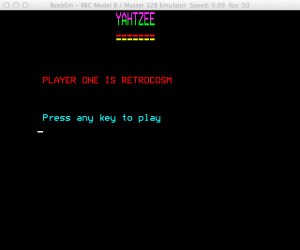
Yahztee Running On BeebEm
What little work was achieved was done using BBC Model B computers. These machines remain very popular and still command a fair price at auction. I’ve been intending to buy one for some time and this current trip down memory lane has jolted me in to action.
I’m therefore awaiting the arrival of a BBC Master, dual disk drives and Microvitec Cub monitor with which I intend to finish my Yahtzee program. While looking for a Model B I chanced upon this listing instead which had a very reasonable ‘Buy it Now’ price.
Having looked through the code that I originally wrote I can remember quite vividly the reason the project remained unfinished. I was unable, or more likely unwilling, to figure out the necessary code to keep score, instead relying on the player to enter it manually.
Clearly this was a cop-out that needs rectifying and I will therefore attempt the figure out the necessary code and finish the program. Whether I can then get upgraded to a ‘B’ from the ‘C’ grade that I originally received remains to be seen.
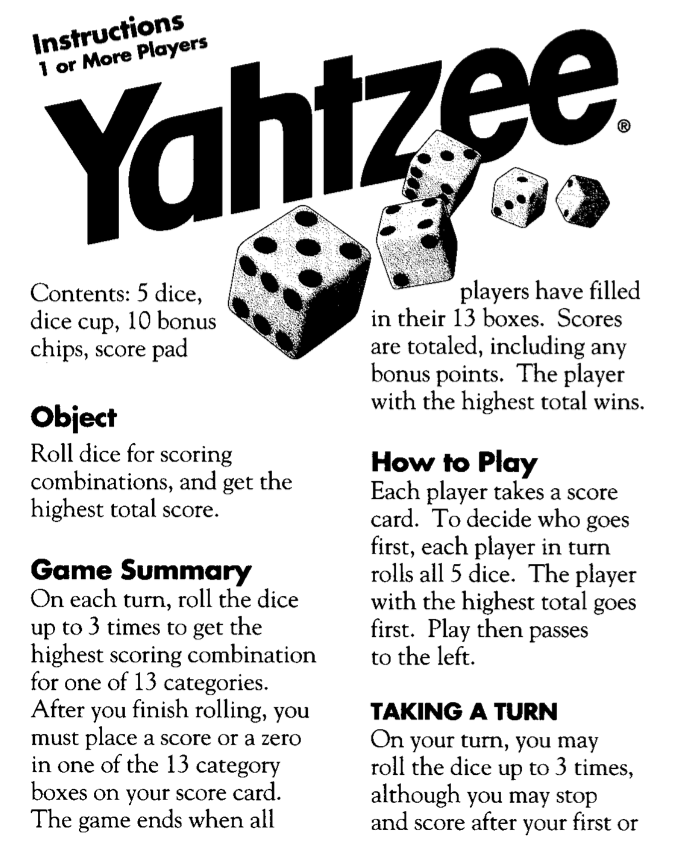
A quick search for ‘Yahtzee Instructions’ led me to a PDF helpfully provided on the Hasbro site. I now need to figure out the most compact and elegant way of determining for scoring purposes which dice the player has rolled. If I can achieve that, if, I may also look at jazzing the graphics up a bit.
Here’s the original code, some of it which I now have no idea what it does:-
   10 Y=0:MODE 7
   20 P=1000
   30 SC=0:U=0:I=0:O=0:P=0
   40 DIM Q$(5):DIM A(5):DIM V(5)
   50 REM YAHTZEE
   60 P=0
   70 CLS:DIM D(5)
   80 PRINT:PRINT:PRINT
   90 PRINTCHR$(141)"            àÇYAHTZEE"
  100 PRINTCHR$(141)"            àÜYAHTZEE"
  110 PRINT:PRINT:PRINT
  120 PRINT"        ÅBy"
  130 PRINT:PRINT:PRINT:PRINT
  140 PRINT"     É     PRESS ANY KEY"
  150 LET B$=GET$:IF B$="" THEN 150
  160 CLS
  170 PRINT:PRINT:PRINT
  180 PRINT"ÉINSTRUCTIONS(Y/N)"
  190 PRINT:PRINT
  200 INPUT A$
  210 IF A$="Y" THEN 1010
  220 IF A$<>"N" THEN 160
  230 CLS
  240 PRINT:PRINT
  250 PRINT"ÑPLEASE ENTER YOUR NAME"
  260 INPUT A$
  270 PRINT:PRINT"ÅTHANKYOU"
  280 CLS
  290 PRINTCHR$(141);"            ÖYAHTZEE"
  300 PRINTCHR$(141);"            ÇYAHTZEE"
  310 PRINTCHR$(141);"            Å======="
  320 PRINTCHR$(141);"            É======="
  330 PRINT:PRINT:PRINT
  340 PRINT"ÅPLAYER ONE IS ";A$
  350 PRINT:PRINT:PRINT
  360 PRINT"ÜPress any key to play"
  370 LET B$=GET$:IF B$=""THEN 370
  380 CLS
  390 Z=Z+1
  400 PRINTCHR$(141);"Ç            YAHTZEE"
  410 PRINTCHR$(141);"            ÜYAHTZEE"
  420 MODE 5
  430 COLOUR 1
  440 PRINT:PRINT
  450 PROCcubes
  460 L=0
  470 FOR L=1 TO 5
  480 LET Z=INT(RND(1)*6)+1:LET V(L)=Z
  490 ON Z GOSUB 880,900,920,940,960,980
  500 PRINT
  510 NEXT L
  520 C=1:REM counter
  530 FOR F=1 TO 5
  540 PRINT TAB(1,25);"HOLD ";F;" ?"
  550 INPUT A$
  560 IF A$="Y" THEN LET A(F)=1
  570 IF A$<>"Y" THEN LET A(F)=0
  580 NEXT F
  590 FOR F=1 TO 5
  600 LET Z=INT(RND(1)*6)+1
  610 IF A(F)=0 THEN LET V(F)=Z
  620 NEXT F
  630 CLS
  640 FOR F=1 TO 5
  650 PRINT
  660 ON V(F) GOSUB 880,900,920,940,960,980
  670 NEXT F
  680 IF C=2 THEN GOTO 710
  690 LET C=C+1
  700 GOTO 530
  710 PRINT "GO ON?"
  720 INPUT X
  730 MODE 7
  740 PROCscores
  750 V=V+1
  760 IF V=6 THEN GOTO 1420
  770 GOTO 420
  780 PRINTTAB(0,0)
  790 RETURN
  800 PRINTTAB(0,20)
  810 RETURN
  820 PRINTTAB(0,40)
  830 RETURN
  840 PRINTTAB(0,60)
  850 RETURN
  860 PRINTTAB(0,80)
  870 RETURN
  880 PROCone
  890 RETURN
  900 PROCtwo
  910 RETURN
  920 PROCthree
  930 RETURN
  940 PROCfour
  950 RETURN
  960 PROCfive
  970 RETURN
  980 PROCsix
  990 RETURN
 1000 INPUT F
 1010 CLS
 1020 MODE 7
 1030 PRINT:PRINT:PRINT"ÅYAHTZEE INSTRUCTIONS"
 1040 PRINT:PRINT"É  Yahtzee is a simulated dice throwing"
 1050 PRINT"Égame for one player."
 1060 PRINT"ÉThe player shakes his dice."
 1070 PRINT"ÉAfter shaking you may pick up any"
 1080 PRINT"Éamount of the dice you wish and shake"
 1090 PRINT"Éagain until you are satisfied with"
 1100 PRINT"Éyour score.You may do this twice after"
 1110 PRINT"Éyour first shake."
 1120 PRINT:PRINT:PRINT"ÑPRESS ANY KEY"
 1130 LET B$=GET$:IF B$="" THEN 1130
 1140 CLS
 1150 PRINT:PRINT:PRINT"Ö YAHTZEE SCORING"
 1160 PRINT:PRINT"ÜPoints are obtained for geting certain"
 1170 PRINT"áÜamounts and patterns on the dice"
 1180 PRINT"Üeg Runs,Sets and Pairs"
 1190 PRINT:PRINT:PRINT"ÉPress any key to play"
 1200 LET B$=GET$:IF B$="" THEN 1200
 1210 GOTO 230
 1220 DEFPROCscores
 1230 CLS
 1240 PRINTCHR$(141);"            ÑSCORING"
 1250 PRINTCHR$(141);"            ÜSCORING"
 1260 PRINTCHR$(141);" Ü          Å======="
 1270 PRINTCHR$(141);"            Ö======="
 1280 PRINT:PRINT
 1290 PRINT"ÅAmounts on dice         Score"
 1300 PRINT:PRINT"ÑLOW RUN                  70"
 1310 PRINT"ÑHIGH RUN                 80"
 1320 PRINT"ÑFULL HOUSE               75"
 1330 PRINT"ÑFOUR OF A KIND           80"
 1340 PRINT"ÑTHREE OF A KIND          70"
 1350 PRINT"ÑTWO PAIRS                50"
 1360 PRINT"ÑONE PAIR                 30"
 1370 PRINT"ÑYAHTZEE                  100"
 1380 PRINT:PRINT" please enter your score "
 1390 INPUT SC
 1400 U=U+SC
 1410 ENDPROC
 1420 PRINT"SCORES"
 1430 PRINT"AFTER 5 GOES YOU HAVE A SCORE OF ";U
 1440 PROCsound
 1450 PRINT"PLAY AGAIN(Y/N)"
 1460 INPUT Y$
 1470 IF Y$="Y" THEN 1490
 1480 GOTO 1510
 1490 RESTORE
 1500 RUN
 1510  CLS
 1520 PRINT"GOODBYE"
 1530 END
 1540 DEFPROCsound
 1550 SOUND 1,-15,97,10
 1560 SOUND 1,-15,105,10
 1570 SOUND 1,-15,89,10
 1580 SOUND 1,-15,41,10
 1590 SOUND 1,-15,69,20
 1600 ENDPROC
 1610 DEFPROCcubes
 1620 VDU 23,224,255,255,255,255,255,255,255,255
 1630 VDU 23,225,255,255,231,195,195,231,255,255
 1640 ENDPROC
 1650 DEFPROCone
 1660 PRINTCHR$(224);CHR$(224);CHR$(224)
 1670 PRINTCHR$(224);CHR$(225);CHR$(224)
 1680 PRINTCHR$(224);CHR$(224);CHR$(224)
 1690 ENDPROC
 1700 DEFPROCtwo
 1710 PRINTCHR$(225);CHR$(224);CHR$(224)
 1720 PRINTCHR$(224);CHR$(224);CHR$(224)
 1730 PRINTCHR$(224);CHR$(224);CHR$(225)
 1740 ENDPROC
 1750 DEFPROCthree
 1760 PRINTCHR$(225);CHR$(224);CHR$(224)
 1770 PRINTCHR$(224);CHR$(225);CHR$(224)
 1780 PRINTCHR$(224);CHR$(224);CHR$(225)
 1790 ENDPROC
 1800 DEFPROCfour
 1810 PRINTCHR$(225);CHR$(224);CHR$(225)
 1820 PRINTCHR$(224);CHR$(224);CHR$(224)
 1830 PRINTCHR$(225);CHR$(224);CHR$(225)
 1840 ENDPROC
 1850 DEFPROCfive
 1860 PRINTCHR$(225);CHR$(224);CHR$(225)
 1870 PRINTCHR$(224);CHR$(225);CHR$(224)
 1880 PRINTCHR$(225);CHR$(224);CHR$(225)
 1890 ENDPROC
 1900 DEFPROCsix
 1910 PRINTCHR$(225);CHR$(224);CHR$(225)
 1920 PRINTCHR$(225);CHR$(224);CHR$(225)
 1930 PRINTCHR$(225);CHR$(224);CHR$(225)
 1940 ENDPROC





 Retrocosm's Vintage Computing, Tech & Music Blog