Epson PF-10 partial success.

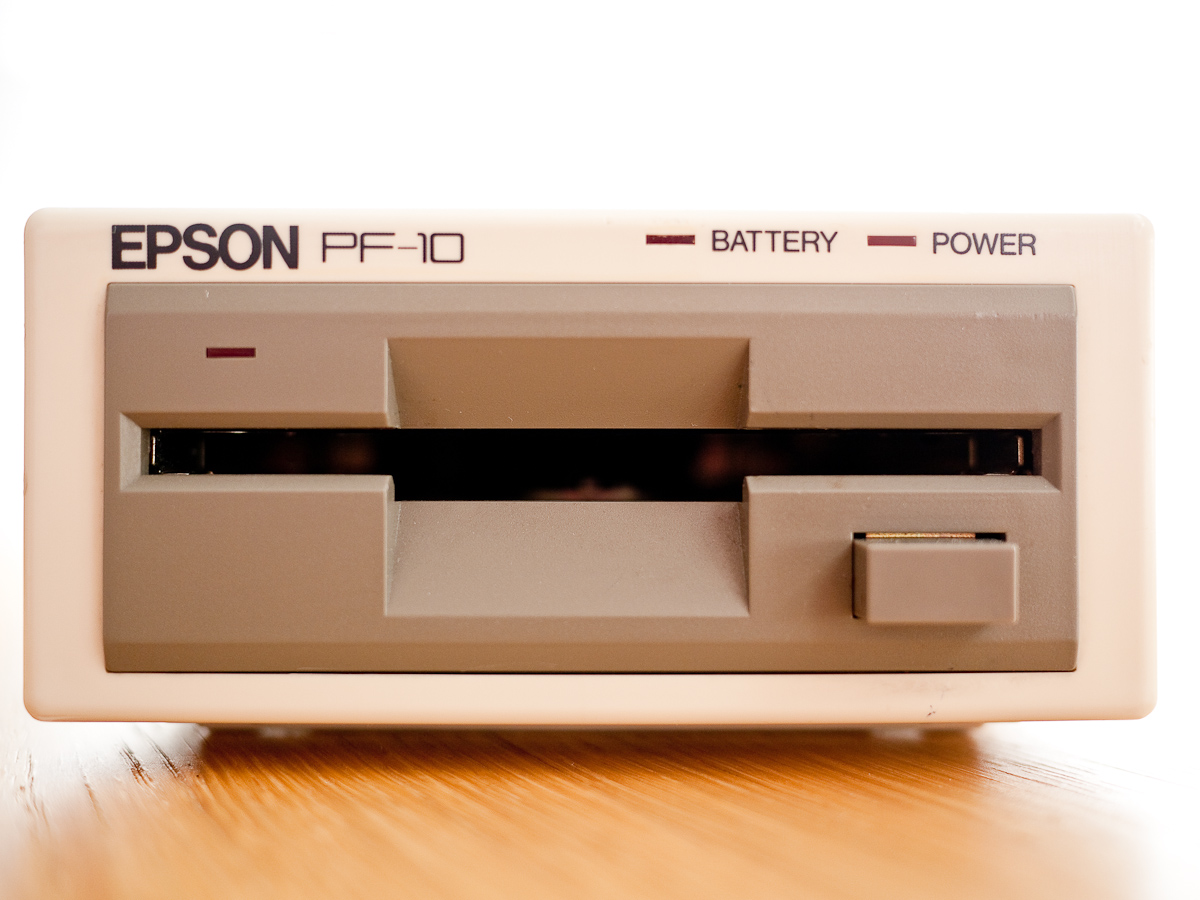
I have a couple of Epson PF-10 portable 3.5″ floppy drive units.  One is in very nice cosmetic condition, the other is pretty battered.  When I initially received them, the battered unit seemed to hold a charge and would spin a disk but never successfully read or write to one.  The other unit worked for a short while, albeit intermittently before completely dying on me.

The PF-10 is an odd beast, taking standard DSDD 3.5″ disks it uses the same 40 track format as the TF-20 5.25″ drive resulting in a formatted disk capacity of 278k.  I don’t know how common battery operated portable floppy drives were but the PF-10 is not unique, a quick search turned up this HP Drive and this drive for the Tandy TRS-80 and I’m sure I once read about a unit for the Cambridge Z88 though I can’t find reference to it.

The PF-10 has a replaceable main NiCad battery which can also be substituted for four dry C cells.  In order to prevent the drive dying in the middle of operation when the battery runs low there’s an additonal sub-battery hardwired inside the unit, a single 4.8v 100 mAh cell.  A battery light on the front of the unit lights when the main battery is low to warn you that the sub battery has kicked in and will subsequently flash when the sub battery itself is running low.

I read sometime ago in the manual that when using dry cells in the unit it may still not work if the sub battery is flat and this is what I found leading me to conclude that the sub battery was dead as I’d made numerous attempts to charge it, no surprise really after 25 years or so.  Putting a meter on the battery confirmed this.

I had envisaged trying to replace the sub battery but my soldering skills are poor and these drives are pretty rare, I don’t want to be responsible for totally wrecking one.  I dug out the battered unit and took it apart thinking I might be able to clean and align the heads on it.  However putting a meter on the sub battery on this unit showed some life in the old cell.

I therefore decided to take both units apart and swap the boards so that the board with the working sub battery would be combined with the drive that had worked in the past.  I then swapped out the original Epson main battery and replaced it with a modern NiMh pack.  On connecting up the drive to the PX-8 things initially looked promising as I was able to read the directory of a disk, however the sub-battery light then immediately came on and shortly after began flashing, then the drive died.

I knew the NiMh pack had a good charge and a meter appeared to show the sub-battery also holding a reasonable charge.  When I plug in the AC adapter the unit works fine which it didn’t do before but at the moment I can’t understand why the unit won’t run off of its batteries and the manual does advise that you shouldn’t run the drive with the adapter attached.

So some success, I can use the drive albeit with the adapter attached.

Remembering Gary Kildall

(Gary Kildall 1942 - 1994)

With Retrochallenge well underway I again find myself deep in the world of CP/M, it therefore seems appropriate to mark the 17th anniversary of the untimely passing of Gary Kildall, its creator.  Much has been written about Gary Kildall and much of it seems contradictory or distorted by vested interests.

With varying stories surrounding both his death and his dealings with IBM, and as someone who only knows of Kildall through coming late to his work it seems appropriate to pull together some resources from others who knew Gary and have written eloquently about him.

Gary Kildall worked as a co-host with Stewart Cheifet on the Computer Chronicles nearly all of which can be accessed here:- Computer Chronicles.  There is an edition dedicated to the memory of Kildall here:- Computer Chronicles – Gary Kildall

Stewart Cheifet was interviewed by Earl Evans on the Retrobits Podcast and spoke at length about Gary, you can find it here:- Retrobits – Stewart Cheifet

A detailed account of Kildall’s work and his dealings with IBM and Microsoft can be found here:- The Gary Kildall Legacy

There’s a fairly recent article here entitled:- The Man Who Could Have Been Bill Gates

A moving Eulogy from Tom Rolander here:- Gary Kildall Eulogy

And lots more info and pictures on the same site:- Digital Research

What is clear to me is that Gary was liked by all who met him and that the personal computer industry as a whole owes him a great debt of gratitude for his enormous contribution.

More on Kildall and CP/M can of course be found on Wikipedia.

Commodore 128D and CP/M

I shall be away for the beginning of this year’s Retrochallenge, so in order to hit the ground running when I get back I thought I’d make sure all my machines were primed and ready for action.  To that end I’ve recently sorted out the batteries in my PX-8’s and today my attention turned to my Commodore 128D.

The machine is in pretty good condition, the cassette port is a bit flaky and the built in 1571 drive seems to read and write to disks reasonably successfully.  My interest lies in using CP/M on the C128 and I really needed to secure a way of getting data into the machine in this mode.

This has caused me some considerable headaches, in its native or C64 mode the machine uses Group Character Recognition (GCR) to write data to the disks in the 1571.  The 1571 is also capable of writing Modified Frequency Modulation (MFM) disks as used by CP/M and under CP/M disks using the following formats can be read:-

With third party software such as Juggler even more formats are supported.

Armed with Big Blue Reader, the original CP/M system disk, a clutch of DSDD disks and my bridge machine running DOS and 22Disk I thought I was well prepared.  However no matter which combination of disks and formats I use I cannot successfully format a disk with the 1571 nor the 1581.  I’m pretty sure the disks are OK, they seem to work without problems with the Epson TF-20 and PX-8 and the 1581 and 1571 drives appear happy to do everything except format.

More in desperation than hope of success I put one of the disks that I’d formatted with the TF-20 and PX-8 in the C128, typed DIR.  To my surprise and excitement the C128 came up with some text at the bottom of the screen reading Epson QX-10.  I pressed return and the drive chugged away, thought about it for a while and came back with ‘No file.’ uh, there were definitely files on the disk.

I had a search around and discovered that when the format description comes up at the bottom of the screen you can cycle through different options.  So I tried again and using the right arrow key found the next selection was ‘Epson Euro’ I pressed return, the drive chugged away and up popped the disk contents, yipeee!

I loaded PIP quickly just to check it worked, which it did and I then formatted a fresh disk in the TF-20, copied the text adventure Snowball onto it and put it into the C128.  On the first attempt I got a BDOS error but on the second attempt it loaded.

So I now have a way of getting software downloaded from the Internet into the C128 in CP/M mode, albeit a somewhat circuitous route via the PX-8 but a way nonetheless.

I currently have the C128 hooked up to an IIyama LCD panel via the s-video port which means I can only run in 40 column mode however I do have a cable that will allow me to connect via Scart and run in 80 column mode which I shall try next as much of the software I’ve tried assumes this mode.

So now hopefully I’ll be able to get on with things as soon as I return, try some CP/M software on the C128, hopefully get it talking to the Epson PX-8 via RS232 and I have some unused 3.5″ DSDD disks on the way which I’m hoping I’ll be able to format successfully with the 1581.