Tweeting From The Epson PX-8

Today was spent fiddling with the configuration of Nostromo, the BBS I’m setting up for testing retro machines.  After a considerable amount of time (much of which was spent trying to remember my mail server passwords) I managed to get the mail forwarding working so I could send e-mail from the BBS.

It then occurred to me it must be possible to Tweet via e-mail.  A quick internet search later and I found Tweety Mail and duly signed up.  At this stage I was only able to get mail out into the wild from the BBS by sending it to another user who had their account set to forward internal mail.  I therefore set up a user account with tweet@tweetymail.com as their e-mail address and logged on with the PX-8.

I’m still experiencing some problems with errant text even when connecting at 300 baud but I can still navigate around and I soon managed to send an e-mail to the tweetymail user account.  Much to my surprise and excitement it duly popped up on Twitter almost immediately.

I decided to shoot some video of the process.  I apologise in advance for the shoddy standards, particularly the bit at the end where I hadn’t planned for moving the camera from the PX-8 to the Mac display and helpfully the camera decided to go on strike when it came to finding focus.  Still it does rather sum up my Retrochallenge, unfocussed but with a clear result in the end.

BBS’ing With The Epson PX-8 Geneva

I’d hoped to acquire an acoustic coupler to use with the Epson PX-8 however it wasn’t to be. Plan B involved connecting up an external modem and I therefore needed some software that would allow me to communicate with the US Robotics unit that I have, Mex from NightOwl Software was the obvious choice.

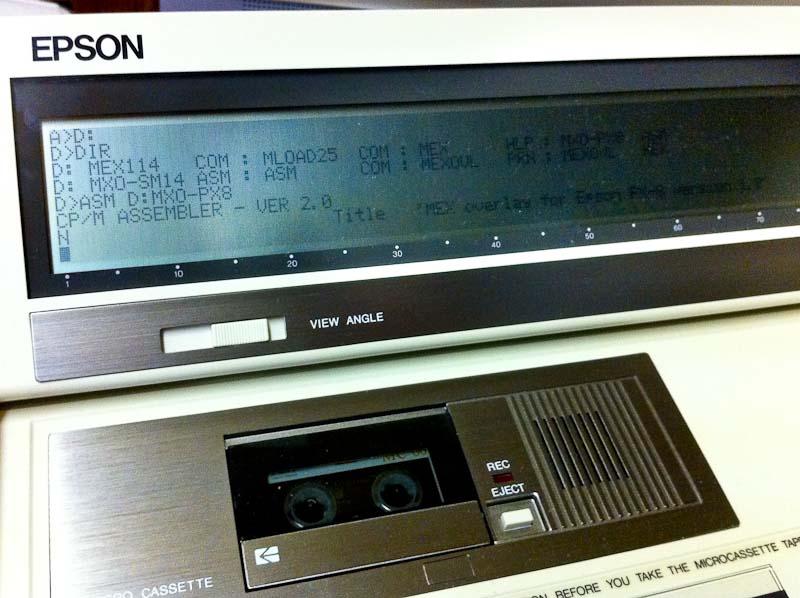
Using this guide I was able to determine which files I needed specifically for the PX-8 which were as follows:-

  • MEX114.COM

    Assembling MEX PX8 Overlay

  • MLOAD25.COM
  • MXO-PX8.ASM
  • MXO-SM14.ASM
  • ASM.COM
  • MEX.HLP

The MXO-PX8 overlay is I believe written specifically for the Epson Multi Function Unit which has a built in modem and sits below the PX-8 connecting via the system bus.  It is therefore also necessary to include a generic Hayes compatible overlay if you need to communicate via RS232 with an external modem.

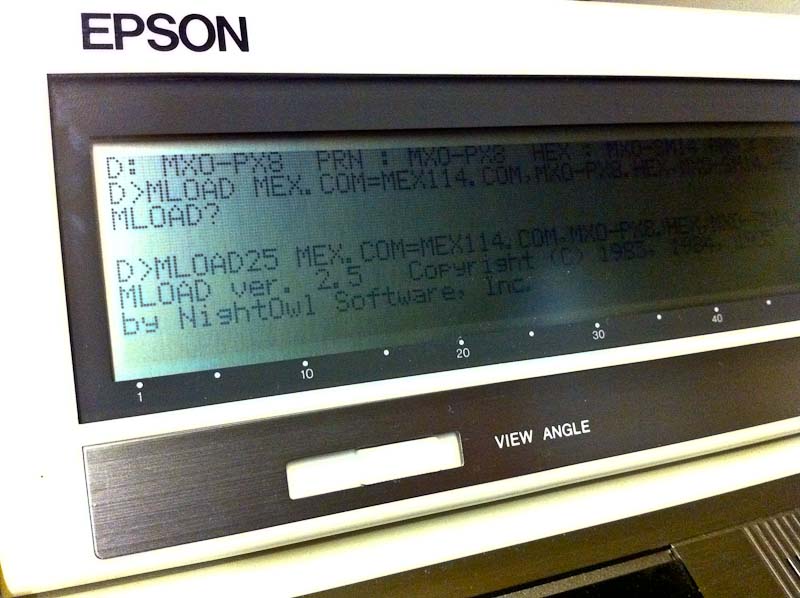
Generating MEX For The PX-8

I used Filink to move all the files that I needed across to the PX-8 and saved them on disk with the TF-20 and used ASM.COM to assemble the overlays.  Using MLOAD you can then generate a MEX executable tailored specifically to your PX-8/Modem set up.

Epson Cable 724

In order to connect a modem to the RS232 interface on the PX-8 you need the Epson 724 cable, which is mini din to DB25.  Fortunately one of my PX-8’s came with this cable and it’s not to be confused with the similar looking 725 cable which is a null modem version.

Px-8 & U.S.R. Modem

So then the moment of truth, what chance this would all work? I decided I should try and find a dial up BBS other than mine own to try.  Wgoodf’s recent blog entry pointed me in the direction of the Plasma Sphere BBS which I didn’t have any luck with but this did lead me to the Arcade BBS.

A nice feature of MEX is you can use either ‘Call’ or ‘Dial’ to initiate the call, the latter will allow you to drop back into the command line and fire up other software if necessary, Kermit for instance.  I stuck with ‘Call’ initially and it worked! Sort Of.  Clearly there are some issues, I’m guessing buffer overruns but I’m sure these can be ironed out.

So here’s a video of me connecting to the Arcade BBS with my Epson PX-8 using Mex:-

(Update, I restricted the RS-232 port to 300 Baud and tried again with better results and have therefore updated the video, ahhh 300 baud, those were the days.)

A UK Dial Up BBS Is Born

A frustrating few days on the Retrochallenge front.  Still no luck in reviving the FDD in the Epson PX-16.  I found some isopropyl alcohol and gave the heads a thoroughly good clean but still no joy.  I ordered the parts I need to build a cable for the RS232 port but they haven’t arrived yet.

I then moved on to try and build a cable that would work with the modem that came installed in the PX-16.  The modem has an RJ45 socket, all the modems that I have owned in the past have come with an RJ11 socket and despite my best attempts I was unable to make a cable for it that would work.  After a considerable amount of time, cable twisting and no dialtone messages I gave up and moved onto something else I’d been meaning to do.

One thing that has struck me since becoming involved in retro computing is that whilst there’s plenty of hardware still out there to enjoy I really miss the more transient elements.  As an example one of my fondest memories of my early computing experiences was using an acoustic coupler and a teletype and connecting for the first time to a remote machine.

Moving forward to the BBS scene and the excitement of dialing machines all over the world, (what my parents made of the phone bill I don’t know) it’s these such experiences that I really miss.  There are of course plenty of BBS’s out there which you can connect to via the Internet but that doesn’t cut it for me from a retro viewpoint, nor are they of any use when it comes to most of my retro hardware.  There are also some dial up systems out there but none that I can find within the UK.

I therefore decided I should try and set up a dial up BBS, if for no other reason than for testing and hopefully connecting some of my retro hardware.  Initially I toyed with the idea of using a Mac Mini G4 that I have in storage, it has a built in modem and the ability to run OS 9.  However I found it quite difficult to find suitable software and therefore turned to my Windows 98 system.  I dug out a Diamond Supra Express PCI modem and installed it and went on the hunt for some BBS software.

I settled pretty quickly on the excellent Synchronet for which the author has also written dial up support. I installed it, connected the modem to a spare phone line that I have at work and after some tinkering had it up and running.  I used my MacMini G4 to connect via another line with Zterm and it all worked very well.  I now need to spend some time configuring things properly and see no reason why I can’t leave this thing running for others to use.

The phone number for now is 01582 600882 (+44 1582 600882) if you want to try it, there’s very little there at the moment but I hope to get some stuff added over the next few days.  The ultimate goal would be to get the BBS running 24/7 on some retro hardware.

I might be fortunate enough to acquire an acoustic coupler for the Epson PX-8 before the end of the month, I already have a suitable retro phone that will fit the cups, so hopefully I might be able to connect the PX-8, now that would be a challenge!