Archive

Archive for July, 2011

Tweeting From The Epson PX-8

July 29, 2011 1 comment

Today was spent fiddling with the configuration of Nostromo, the BBS I’m setting up for testing retro machines.  After a considerable amount of time (much of which was spent trying to remember my mail server passwords) I managed to get the mail forwarding working so I could send e-mail from the BBS.

It then occurred to me it must be possible to Tweet via e-mail.  A quick internet search later and I found Tweety Mail and duly signed up.  At this stage I was only able to get mail out into the wild from the BBS by sending it to another user who had their account set to forward internal mail.  I therefore set up a user account with tweet@tweetymail.com as their e-mail address and logged on with the PX-8.

I’m still experiencing some problems with errant text even when connecting at 300 baud but I can still navigate around and I soon managed to send an e-mail to the tweetymail user account.  Much to my surprise and excitement it duly popped up on Twitter almost immediately.

I decided to shoot some video of the process.  I apologise in advance for the shoddy standards, particularly the bit at the end where I hadn’t planned for moving the camera from the PX-8 to the Mac display and helpfully the camera decided to go on strike when it came to finding focus.  Still it does rather sum up my Retrochallenge, unfocussed but with a clear result in the end.

Categories: BBS, Computers, CP/M, Epson PX-8, Retro

BBS’ing With The Epson PX-8 Geneva

July 28, 2011 Leave a comment

I’d hoped to acquire an acoustic coupler to use with the Epson PX-8 however it wasn’t to be. Plan B involved connecting up an external modem and I therefore needed some software that would allow me to communicate with the US Robotics unit that I have, Mex from NightOwl Software was the obvious choice.

Using this guide I was able to determine which files I needed specifically for the PX-8 which were as follows:-

  • MEX114.COM

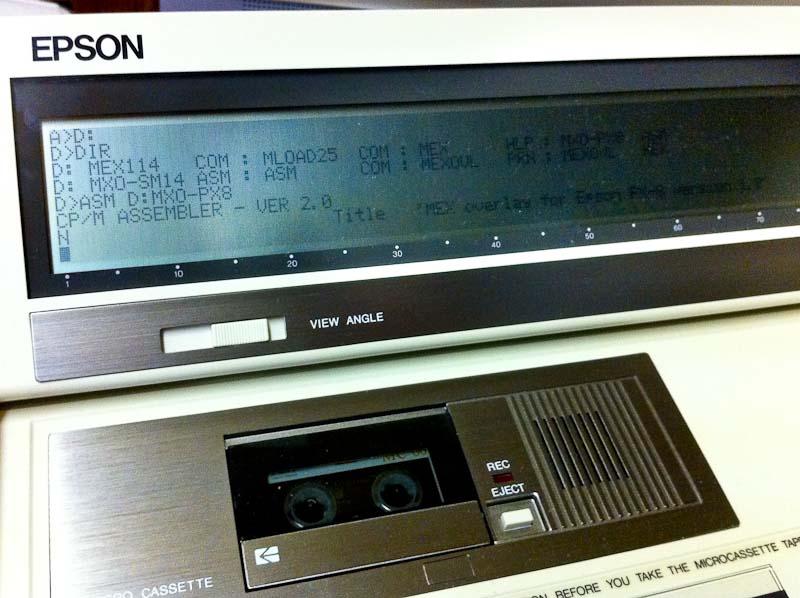
    Assembling MEX PX8 Overlay

  • MLOAD25.COM
  • MXO-PX8.ASM
  • MXO-SM14.ASM
  • ASM.COM
  • MEX.HLP

The MXO-PX8 overlay is I believe written specifically for the Epson Multi Function Unit which has a built in modem and sits below the PX-8 connecting via the system bus.  It is therefore also necessary to include a generic Hayes compatible overlay if you need to communicate via RS232 with an external modem.

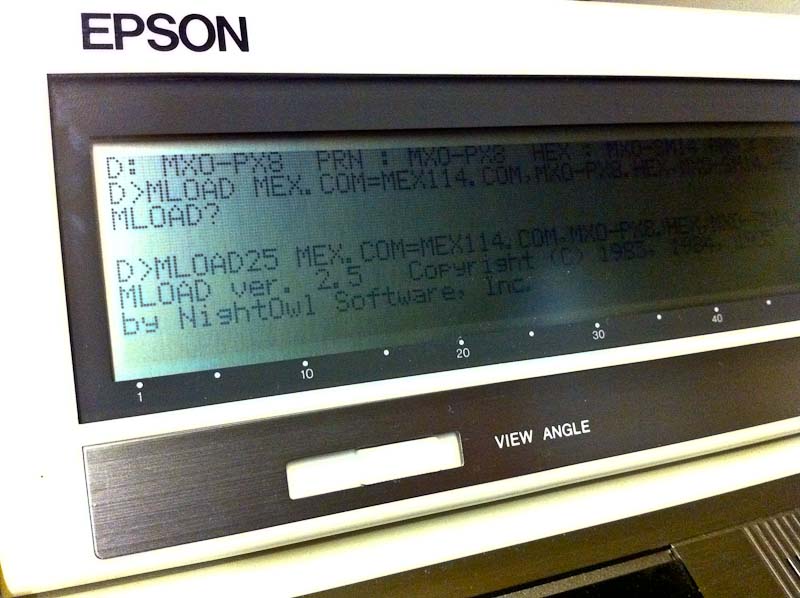
Generating MEX For The PX-8

I used Filink to move all the files that I needed across to the PX-8 and saved them on disk with the TF-20 and used ASM.COM to assemble the overlays.  Using MLOAD you can then generate a MEX executable tailored specifically to your PX-8/Modem set up.

Epson Cable 724

In order to connect a modem to the RS232 interface on the PX-8 you need the Epson 724 cable, which is mini din to DB25.  Fortunately one of my PX-8′s came with this cable and it’s not to be confused with the similar looking 725 cable which is a null modem version.

Px-8 & U.S.R. Modem

So then the moment of truth, what chance this would all work? I decided I should try and find a dial up BBS other than mine own to try.  Wgoodf’s recent blog entry pointed me in the direction of the Plasma Sphere BBS which I didn’t have any luck with but this did lead me to the Arcade BBS.

A nice feature of MEX is you can use either ‘Call’ or ‘Dial’ to initiate the call, the latter will allow you to drop back into the command line and fire up other software if necessary, Kermit for instance.  I stuck with ‘Call’ initially and it worked! Sort Of.  Clearly there are some issues, I’m guessing buffer overruns but I’m sure these can be ironed out.

So here’s a video of me connecting to the Arcade BBS with my Epson PX-8 using Mex:-

(Update, I restricted the RS-232 port to 300 Baud and tried again with better results and have therefore updated the video, ahhh 300 baud, those were the days.)

Categories: BBS, Computers, CP/M, Epson PX-8, Retro, TF-20

A UK Dial Up BBS Is Born

July 25, 2011 7 comments

A frustrating few days on the Retrochallenge front.  Still no luck in reviving the FDD in the Epson PX-16.  I found some isopropyl alcohol and gave the heads a thoroughly good clean but still no joy.  I ordered the parts I need to build a cable for the RS232 port but they haven’t arrived yet.

I then moved on to try and build a cable that would work with the modem that came installed in the PX-16.  The modem has an RJ45 socket, all the modems that I have owned in the past have come with an RJ11 socket and despite my best attempts I was unable to make a cable for it that would work.  After a considerable amount of time, cable twisting and no dialtone messages I gave up and moved onto something else I’d been meaning to do.

One thing that has struck me since becoming involved in retro computing is that whilst there’s plenty of hardware still out there to enjoy I really miss the more transient elements.  As an example one of my fondest memories of my early computing experiences was using an acoustic coupler and a teletype and connecting for the first time to a remote machine.

Moving forward to the BBS scene and the excitement of dialing machines all over the world, (what my parents made of the phone bill I don’t know) it’s these such experiences that I really miss.  There are of course plenty of BBS’s out there which you can connect to via the Internet but that doesn’t cut it for me from a retro viewpoint, nor are they of any use when it comes to most of my retro hardware.  There are also some dial up systems out there but none that I can find within the UK.

I therefore decided I should try and set up a dial up BBS, if for no other reason than for testing and hopefully connecting some of my retro hardware.  Initially I toyed with the idea of using a Mac Mini G4 that I have in storage, it has a built in modem and the ability to run OS 9.  However I found it quite difficult to find suitable software and therefore turned to my Windows 98 system.  I dug out a Diamond Supra Express PCI modem and installed it and went on the hunt for some BBS software.

I settled pretty quickly on the excellent Synchronet for which the author has also written dial up support. I installed it, connected the modem to a spare phone line that I have at work and after some tinkering had it up and running.  I used my MacMini G4 to connect via another line with Zterm and it all worked very well.  I now need to spend some time configuring things properly and see no reason why I can’t leave this thing running for others to use.

The phone number for now is 01582 600882 (+44 1582 600882) if you want to try it, there’s very little there at the moment but I hope to get some stuff added over the next few days.  The ultimate goal would be to get the BBS running 24/7 on some retro hardware.

I might be fortunate enough to acquire an acoustic coupler for the Epson PX-8 before the end of the month, I already have a suitable retro phone that will fit the cups, so hopefully I might be able to connect the PX-8, now that would be a challenge!
Categories: Apple, Computers, PX-16, Retro

Epson PX-8 Terminal

July 16, 2011 1 comment

I’ve been messing around with some terminal stuff today.  I have almost no experience of terminal software so it’s not coming naturally to me.  What I had hoped to achieve was to use the PX-16 with its clearer screen as a dumb terminal for the PX-8.

I don’t yet have a serial cable that fits the PX-16 so I’ve been experimenting with the PX-8 hooked up via RS232 to my Windows 95 box.  By luck one of the PX-8′s I have came with a pre-configured copy of Kermit.  I downloaded Kermit for Windows 95 and set about trying to get them to talk to each other.  After a bit of fiddling I managed to get the PX-8 acting as a sort of dumb terminal for the other box.

What I really want is to do this the other way around but due to my ignorance of the subject I don’t know if that’s even possible, whether you can control a CP/M box via DOS or if you need two CP/M based machines.  In my mind the terminal is just acting as screen and keyboard for the other machine but it doesn’t seem to be working that way.  Still early days and some reading required.

This is just a quick video of me changing directory and listing the directory of the Windows 95 machine on the PX-8.

Epson PX-8 PF-10 & TF-20

July 15, 2011 Leave a comment

Having declared in an earlier post that I’d managed to get the PF-10 working again I thought I should really post some proof.

I apologise for the shaky, and frankly poor quality of this video, I forgot my tripod and camera and had to fall back on the iPhone.

I just show the PX-8 going through the available drives:-

A: Ram Disk

B: Basic ROM

C: System ROM

D: TF-20 5.25″ FDD 1

E: TF-20 5.25″ FDD 2

F: PF-10 3.5″ FDD

H: Mini Cassette (Realised I forgot this, bless it)

Who Are You Calling Fugly?

July 14, 2011 6 comments

Epson PX-16 (Gorgeous)

OK, I know it looks a bit like a cash register, especially when it’s sitting on the disk unit but I like it!  I’ve removed all of the internals today and given the cases a good clean inside and out.  I’ve secured the FDD and HDD in the working disk unit and made an attempt to get the FDD working.

Epson SMD-400 FDD

The FDD is an Epson SMD-400.  Like the HDD it has a non-standard connection, with power being supplied via the interface cable as opposed to the usual separate cable.  Unlike the HDD it doesn’t work and I’ve been unable to make it read or write to any disks.  I’ve had it apart and fiddled a bit with the spin speed and head alignment but no joy.  Oddly a cable to nowhere has been soldered to the board, I have no idea what it would have been connected to but hope it’s not something painfully obvious like the head.

The unit does spin up and the head moves around but it fails on every disk I’ve tried.  It would of course be nice to slot another drive in there, I’ve got plenty of them but of course they all require a separate power cable.

Piggybacking the FDD

With no serial cable and no FDD I’m rather limited on what I can do with the machine as I’m unable to get any files on to it.  In desperation I opened up my Windows 95 box and trailed the cable from its floppy into the PX-16 disk unit so the Windows 95 box could power it.  However with it connected to the floppy interface on the PX-16 the Epson won’t start up.

PX-16 XTGold

I gave up and turned my attention to the installed modem.  It has an RJ connector that I’ve not seen on a UK modem before.  Usually they’re RJll’s with 4 connections.  This looks more like an RJ45 and it has 8 connections, although it’s a UK specified machine and the modem is made by a UK company.

I started up Term and sent some modem commands to COM 2 and got the usual OK’s back.  I tried to kludge a cable together but was unable to get a dial tone.  So a slightly more frustrating day today although I did have fun playing with XTGold which was on the disk I’d salvaged from the Equity, it seems like quite an impressive file manager.


More PX-16 Adventures

July 13, 2011 2 comments

Things are progressing quickly with the PX-16.  Having got the main unit working my attention was today turned to the two disk units that came with the Epson.  Designed to hold either one or two FDD’s or an FDD and an HDD the units sit under and clip onto the main machine.  The two units are then connected via a cable at the back.

JVC JD-3824

The first unit I tried seemed dead, no amount of fiddling would coax it into life.  The second unit however powered up first time, although the FDD in it won’t currently read or write to any disks.  The dead unit had a daughter card and from it a cable with a 26 pin connector which I assumed was for the HDD, although I’d not seen that sort of connector before.

Epson Equity

I enquired over at the Vintage Computer Forums as to whether anyone recognised this connector.  Mike S & Chuck G pointed me in the direction of the JVC JD-3824 drive, Chuck remembering it from a Gridlite he used to own.  I did a search for JVC JD-3824 and had a doh! moment when my own blog came up.  This is the drive in my Epson Equity.  I was considering, somewhat reluctantly, taking the Equity apart and trying the HDD in the PX-16.

26 Pin Connector

Then I remembered I had another Equity, seriously beaten up and not working, tucked away somewhere.  I dug it out, took it apart and low and behold there was a JVC JD-3824 drive in it and on the drive that familiar 26 pin connector and cable, I love moments like that!

JVC JD-3824 in the PX-16

I quickly removed the drive, cleaned it up and put it in the PX-16 drive unit into which I’d also installed the daughter card from the dead unit.  I turned it on and… nothing.  Then I noticed a jumper by the mainboard connector to the daughter card.  On checking the unit from which I’d removed the daughter card I realised the jumper was in the alternative position.

PX-16 & Disk Unit

I swapped the jumper, turned the unit on and the HDD whirred into life.  Not only that but it actually booted to the drive’s original installation of MS-DOS.  I was astonished to say the least, it’s noisy and clunky but I love it.

PX-16 Mainboard with ROM Sockets (Right) & Modem (Left)

The PX-16 is highly configurable, in fact it’s so highly configurable that it makes my head hurt.  There’s a bank of DIP switches in the unit to set depending on which configuration you require.  This includes two boot modes, one of which behaves like a regular PC but also denies access to the system’s ROM’s.  I’m still trying to fully understand the other mode.

I’d like to try and get the FDD working next and I want to build an RS232 cable at some point.  The system also came with some additional RAM which I can’t seem to access in the PC boot mode although it’s available in the standard mode so I need to look at that.

Additional RAM

There’s also a Modem in the unit which I’d like to try and I need to do some swapping around to get all the working components into the cleanest cases and secure the various drives properly.

Epson PX-16 Working

July 12, 2011 Leave a comment

Without too much difficulty I’ve managed to get the PX-16 up and running.  The battery won’t currently hold a charge but thankfully the unit can be used with the AC adapter attached.

On first turning the machine on it would simply beep and display some odd glitches on the screen.  After referring to the manual and simply resetting the DIP switches on the unit to correspond with the display that was attached it booted up.

The unit is currently booting from ROM, it can also be set to boot from floppy but I’ve yet to get the disk unit working, there’s also a 26 pin connector in the disk unit which I assume is some sort of proprietary HDD connection.

I’m having a fair amount of difficulty tracking down much information on the PX-16.  From what I can tell it was mainly used in Europe and often by field service engineers.  Its modular design allows you to swap out the keyboard and screen for alternative versions and like the PX-4 it has a removable cartridge on the right of the machine which can house various peripherals.

Categories: Epson PX-4, MS-DOS, PX-16, Retro

Epson PX-16 Throws A Googly

July 11, 2011 Leave a comment

It’s looking as though this Retrochallenge is going to end up considerably less focused than the last.  Not helped by a late start due to a family holiday I’ve now been thrown a googly by the arrival of a new machine.

For some time I’ve lusted after an Epson PX-16 and with one recently listed on Ebay it was an opportunity not to be missed.  Listed as non-working but including some additional bits such as a spare screen and disk unit I felt confident I’d be able to resurrect it so I put in a bid.  Somewhat amusingly for me, not so much the seller I got it for 99 pence.

It’s in good condition cosmetically and I’ve put it on charge hopeful that I’ll be able to get it working tomorrow.  Information on the PX-16 is pretty scarce, as usual for old Epson stuff the best resource is Fred Kraan’s excellent site.


I shall try and find out some more information and take some better pictures in due course.  For now I know this machine runs MS-DOS 3.2 from ROM and has an 8088 compatible V20 processor.  In the picture above the PX-16 is sitting on top of the optional disk unit which can house two floppy drives or a floppy drive and hard disk.

Categories: Computers, MS-DOS, PX-16, Retro

Epson PF-10 partial success.

July 11, 2011 Leave a comment

I have a couple of Epson PF-10 portable 3.5″ floppy drive units.  One is in very nice cosmetic condition, the other is pretty battered.  When I initially received them, the battered unit seemed to hold a charge and would spin a disk but never successfully read or write to one.  The other unit worked for a short while, albeit intermittently before completely dying on me.

The PF-10 is an odd beast, taking standard DSDD 3.5″ disks it uses the same 40 track format as the TF-20 5.25″ drive resulting in a formatted disk capacity of 278k.  I don’t know how common battery operated portable floppy drives were but the PF-10 is not unique, a quick search turned up this HP Drive and this drive for the Tandy TRS-80 and I’m sure I once read about a unit for the Cambridge Z88 though I can’t find reference to it.

The PF-10 has a replaceable main NiCad battery which can also be substituted for four dry C cells.  In order to prevent the drive dying in the middle of operation when the battery runs low there’s an additonal sub-battery hardwired inside the unit, a single 4.8v 100 mAh cell.  A battery light on the front of the unit lights when the main battery is low to warn you that the sub battery has kicked in and will subsequently flash when the sub battery itself is running low.

I read sometime ago in the manual that when using dry cells in the unit it may still not work if the sub battery is flat and this is what I found leading me to conclude that the sub battery was dead as I’d made numerous attempts to charge it, no surprise really after 25 years or so.  Putting a meter on the battery confirmed this.

I had envisaged trying to replace the sub battery but my soldering skills are poor and these drives are pretty rare, I don’t want to be responsible for totally wrecking one.  I dug out the battered unit and took it apart thinking I might be able to clean and align the heads on it.  However putting a meter on the sub battery on this unit showed some life in the old cell.

I therefore decided to take both units apart and swap the boards so that the board with the working sub battery would be combined with the drive that had worked in the past.  I then swapped out the original Epson main battery and replaced it with a modern NiMh pack.  On connecting up the drive to the PX-8 things initially looked promising as I was able to read the directory of a disk, however the sub-battery light then immediately came on and shortly after began flashing, then the drive died.

I knew the NiMh pack had a good charge and a meter appeared to show the sub-battery also holding a reasonable charge.  When I plug in the AC adapter the unit works fine which it didn’t do before but at the moment I can’t understand why the unit won’t run off of its batteries and the manual does advise that you shouldn’t run the drive with the adapter attached.

So some success, I can use the drive albeit with the adapter attached.


Categories: CP/M, Epson PX-8, PF-10, Retro
Follow

Get every new post delivered to your Inbox.

Join 60 other followers