Noisy Mac Pro Fans

For various domestic reasons (children) my Mac Pro has ended up in my bedroom, on a carpet.  This is arguably the least ideal location to locate a computer other than of course the bathroom, given the level of dust accumulation in the typical conjugal bedroom.

One advantage however is that my wife and I can at least watch content from the BBC’s iPlayer whilst lazing in bed.  Not so advantageous however is the increasingly intolerable level of noise being produced by the machine, or more directly its fans.

This increase has been gradual and although I knew the current levels were clearly not as the Apple engineers had intended I couldn’t remember what the noise levels were when I originally bought the machine.

I decided to take the machine apart for a clean, and as it transpires not a moment too soon.  I removed the RAM riser boards which were caked in dust and fluff and blew them through (outside) with my own surprisingly still powerful lungs.  This dislodged the vast majority of the muck so encouraged I set the riser cards aside and removed the hard disks.

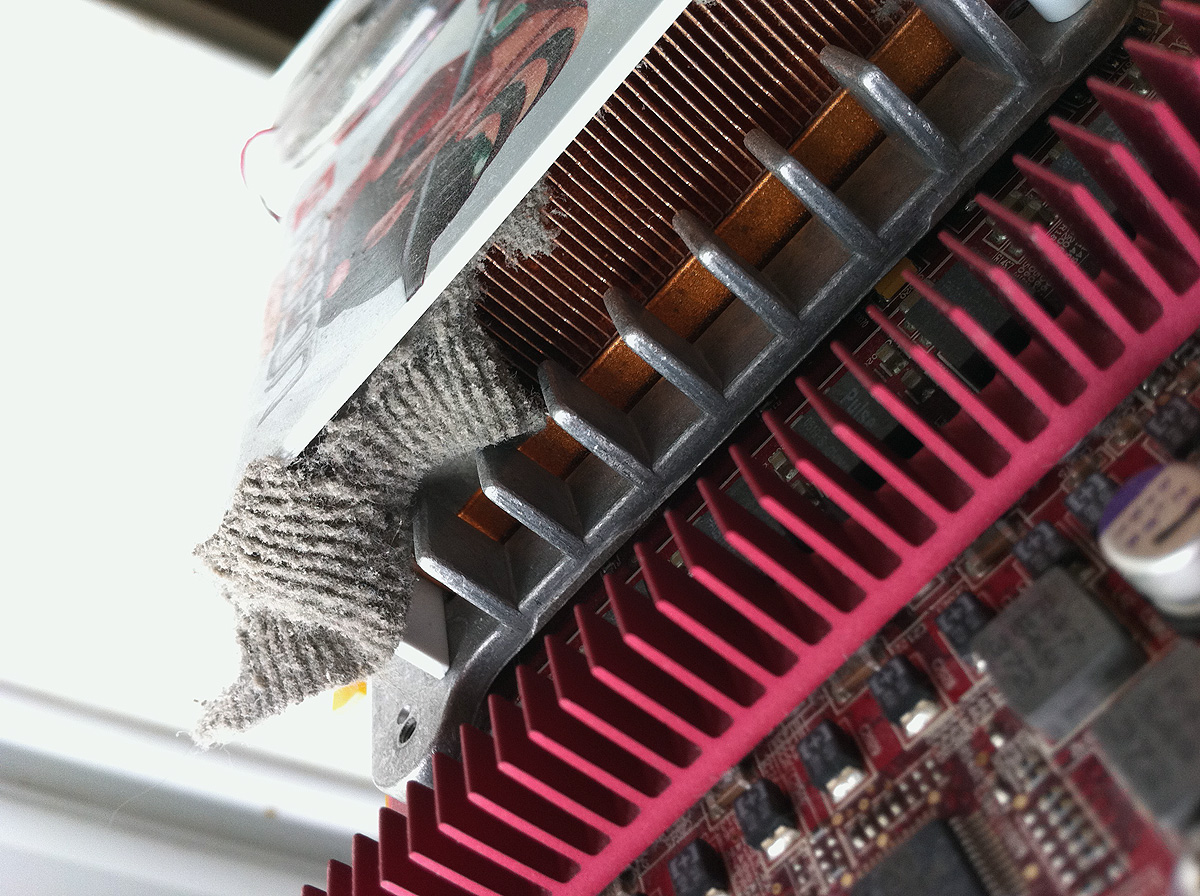
All four slots are occupied in my Mac Pro and each disk had a fair amount of dust on.  Next came the ATI graphics card (a Radeon X1900.)  Oh dear, it was grim, similarly as thick with dust as the RAM on first inspection it was then I discovered what I imagine has been the main issue.  The card is one of those double width monsters with a huge heatsink and fan.  On the side of the heatsink opposite to the fan, where the air is drawn through was what I can only describe as a small carpet blocking the airflow (picture below.)

Much huffing and puffing later the ‘carpet’ came free, the process was akin to changing the filter in a vacuum cleaner!  Whilst I had the box open I took the opportunity to remove the DVD drive bay which was also pretty filthy.  I then took the carcass of the machine outside and blew through the area where the processors are located, a thick cloud of dust came out of the machine.  I decided to reassemble the machine at this point and try it, I’d like to get access to the processors heatsinks but it’s quite involved and I’ll probably break something.

I’m pleased to say I am now reminded how much noise this machine is intended to make, not a lot, under typical use it’s almost whisper quiet.  On watching some iPlayer content whilst encoding a video file with Quicktime there was a barely, if at all, perceptible increase in noise.  Now I’m just angry that I left it this long but pleased the situation is resolved.

(Update)

Right, so I’m encoding a video into H.264, I’m applying a radial blur to a 21 megapixel image, I’m live streaming iPlayer, browsing the web and playing chess and the machine is still whisper quiet, good grief I can’t believe what a dufus I am.
PX-8 Intelligent Ram Disk Working

I was pleasantly surprised to find that a PX-8 that I’d recently bought on Ebay (to secure a PF-10) came with the Intelligent RAM Disk add-on that sits like a wedge under the machine.  Initially however both of the PX-8’s I tried it with would continually give BDOS errors whilst it was connected.  I came to the conclusion that the batteries in the unit were causing the problems as the unit is in very good condition and shows no obvious signs of damage or harsh treatment.

I don’t have a manual for the unit, however yet again FJ Kraan’s excellent site comes to the rescue with a PDF of the manual.  As Fred Jan pointed out BDOS errors can be caused by the Write Protect Switch being in the on position however I’d already tried the unit with the switch set to off.

My original PX-8 needed charging so I decided to attach the RAM Disk again and give the machine a full charge.  On turning on I was still presented with BDOS errors.  I then did the following things, stupidly I can’t remember in which order.  I initialised the machine by pressing the reset switch whilst holding down Right-Shift and Num-Graph.  I unscrewed the RAM Disk and with it still connected by cable disconnected the PX-8’s main battery and flicked the switch next to it back and forward and reconnected the battery.  I also opened the ROM cover under the machine and pressed the Initial Reset button.

On reassembling and turning the unit back on I was presented with the Initialisation Screen and was then given the option to format the RAM disk which worked, hooray.  I now have an unfathomably large 120k RAM disk to play with!

Don’t you just love it when you try something and it works even though you were pretty sure it wouldn’t.  I’m now referring to using Filink to transfer files between the two PX-8’s.  I was attempting (again) to resuscitate one of my PF-10’s with no luck when I somehow ended up with the drive cable actually connecting the two PX-8’s together.

Fed up with the PF-10 and inspired by my cable stupidity I moved the cable from the serial ports to the RS232c ports and attempted to transfer some files between the PX-8’s confident that the cable would be incorrectly wired.

However Filink immediately sprang into life and happily transferred files back and forward between the two machines.

Going back to the PF-10’s I’m now working on the assumption that the on board backup batteries are dead.  I note in the manual for the drive on page 1-4 it states:- When using dry batteries, the PF-10 may not operate if the sub-battery is not sufficiently charged.

These sub-batteries are soldered onto the boards so swapping them out is a task beyond my abilities however it’s certainly something to consider for the future.

Video Of Bomber On The Atari Portfolio

Using my recently acquired parallel port interface for the Atari Portfolio I’ve been successfully transferring files onto the Portfolio from my Windows 95 box.  Initially the process would not work, however after setting the parallel port to Auto in the PC’s BIOS, transfers worked perfectly.

I’ve been trying a number of games and utilities, one that caught my eye was Bomber by Jaraslav Janda as it’s a version of the game Blitz (which was probably a version of the original) which was the first game I bought for my Vic 20 back in 1983/84.  I shot some video with my iPhone of me playing it, badly:-

Following my previous blog entry regarding printing on the Portfolio with the Epson P-40 portable thermal printer I’ve also now made a video:-

The portfolio speaks:-